
I have been playing AFK Journey on BlueStacks for a while now, and the single biggest upgrade I made in 2026 was not a new hero or a different formation — it was locking my emulator and game to a stable 60 FPS. At first, I was fine with the default experience, but once I saw how much cleaner every battle animation, menu transition, and exploration scene looked at a higher frame rate, I could not go back. The game already looks beautiful, but smooth motion changes the feel of the whole journey. This is the setup I use now, and it is still simple enough that I can repeat it after any fresh install.
Why I Care About 60 FPS in AFK Journey
AFK Journey is not a twitch shooter, so it is easy to think frame rate does not matter. I thought the same until I compared a choppy battle against a smooth one. At 60 FPS, hero attacks land with clearer timing, skill effects look more fluid, and the camera pans across the map without that subtle stutter. I also notice fewer muddy moments when several effects fill the screen. For me, the biggest win is comfort: my eyes tire less during long sessions, and I can follow the action more easily.
BlueStacks usually runs AFK Journey at 60 FPS by default, but some PCs need a little more configuration. I learned to check both the emulator and the in-game settings instead of assuming everything is perfect. If the frame rate feels inconsistent, the fix is usually a resource allocation issue or a graphics option that is set too high or too low for the rest of the system.
My BlueStacks Performance Settings
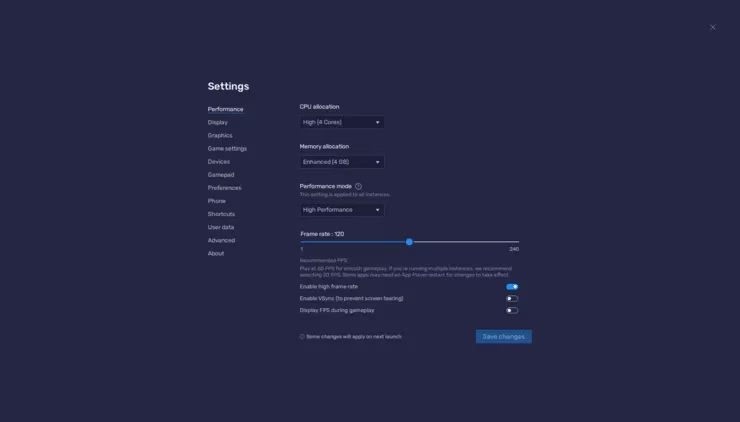
I start in BlueStacks, because the emulator sets the ceiling for everything else. I open the Settings menu, move to the Performance tab, and check the basics first. My rule is simple: give the emulator enough room to breathe, then lock the frame rate.
| Setting | My 2026 choice | Why I use it |
|---|---|---|
| RAM | At least 4 GB | Keeps AFK Journey from fighting the emulator for memory |
| CPU cores | At least 4 | Helps battles and menus stay responsive |
| Performance mode | High performance | Prioritizes speed over power saving |
| FPS slider | 60 or higher | Gives me the smooth motion I want |
| Save changes | Always | Confirms the profile before launch |
Here is the exact flow I follow:
-
Open BlueStacks Settings. 🛠️
-
Go to the Performance tab.
-
Confirm the emulator has at least 4 GB of RAM and 4 CPU cores.
-
Set Performance mode to High performance.
-
Move the FPS slider to at least 60 FPS.
-
Click Save changes in the bottom right corner.
-
Launch AFK Journey and open the in-game settings.
I do not blindly max out every value. If my PC is older, I keep the baseline at 4 GB and 4 cores and leave the rest alone. Stability matters more than a big number that causes frame drops.
Matching the In-Game Graphics Settings
Once AFK Journey is open, I go to the in-game settings and set the graphical options to the highest level my PC can handle. The reference guide suggests setting the performance option near the bottom to Unlimited if the game offers it; if not, 60 FPS is the target. I follow the same logic in 2026. Unlimited can be useful on a strong machine, but I only choose it when my emulator profile is already stable. On a more modest setup, I keep the cap at 60 FPS and enjoy the consistency.
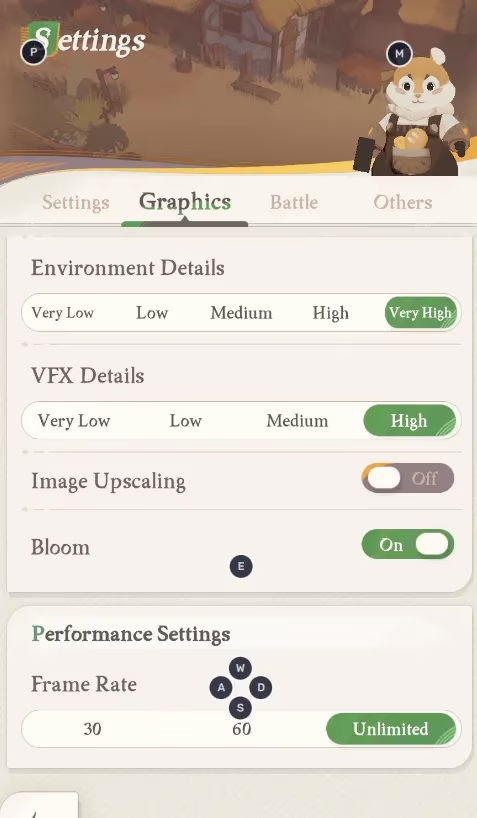
After changing the settings, I restart the game once. That extra step helps me confirm the new profile is active. Then I watch a battle and walk through a town area. If the motion is clean, I am done. If not, I lower one graphics option at a time instead of changing five things at once.
The Little Benefits I Notice Every Session
Playing on BlueStacks also gives me a larger screen, customizable controls, and a more comfortable setup for long sessions. The 60 FPS upgrade ties all of that together. My reactions in battle feel sharper, exploration feels smoother, and the art style finally gets the motion it deserves. I still play AFK Journey casually, but the experience now feels polished rather than merely convenient. For me, that is the real win in 2026: a simple settings routine that makes every session clearer, faster, and more enjoyable.
Happy gaming! 🎮